The birthday problem — Part 1: When counting fails
After the “toy problem” of the previous post, I decided to take a chance at a more tangible, real-world question. Consider this one:
What is the probability that two students in a classroom share the same birthday?
Intuitively (and correctly), you might think it depends on the total number of students. But for a realistic classroom of around 20 students, the probability should be quite low - whatever “low” means. After all, how many times have you witnessed that?
In the first part of this series on the birthday problem, we’ll dissect it and see why it’s more complex than its phrasing suggests. If you stick around for the next part(s), the answer might surprise you. And if it doesn’t (because you cheated and looked it up), it’s ok. After all it’s not just about the answer, it’s about how we get there.
Exploring the question
Before looking at any numbers, it’s good practice to examine the question in order to understand it. First things first: what exactly is a birthday?
Definition: For us, a birthday is one day of the year, associated with each student. If we consider 365 days in a year (no leap years), then a birthday can be any date throughout the year.
Let’s define this in terms of code, for the year 2022:
all.dates <- seq(from=as.Date("2022-01-01"),
                 to=as.Date("2022-12-31"),
                 by=1)

# Confirm the length of our created date sequence
length(all.dates)
## [1] 365
Code explanation
We create a vector containing all dates in 2022 and store it in the all.dates variable so we use it in our code later.
-
We use the
seqfunction to create a sequence of all the dates from January 1st 2022 to December 31st 2022. We set the increment argument (by) to 1, to include all dates without skipping any day. -
The
as.Datefunction converts the given text ("2022-01-01"and"2022-12-31") to a date format so it is interpreted correctly and all the in-between dates are created.
The length function gives us the number of elements of any given input (in this case the all.dates vector). We do this just to be extra sure of what we created. In this case, we got 365 elements (all days of a full year), so we’re good to go.
The figure below shows how birthdays might look like in four random classrooms of 5 students.
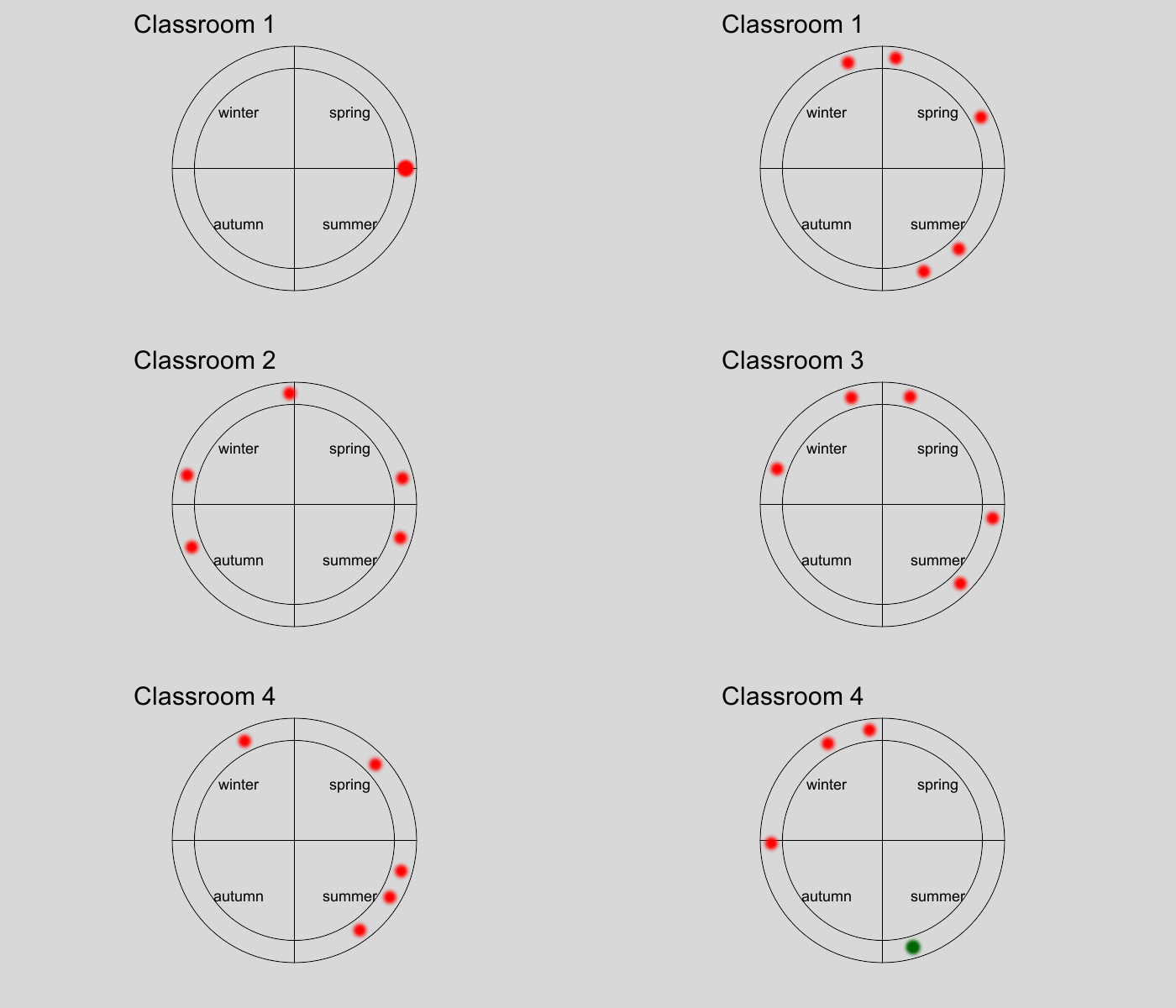
Figure 1: Illustration of birthdays throughout the year (red dots), in four different classrooms with 5 students each. Two birthdays coincide in classroom 4 (green dot).
As mentioned, this probability should depend on classroom size (or nstudents). To focus on the bigger picture, we can ask how classroom size affects the probability:
How does classroom size (nstudents) affect the probability that there is a shared birthday?
We also want to consider the case of more than 2 students sharing a birthday: if the classroom has 3 students sharing a birthday, or 2 pairs of students with shared birthdays, it should still count for us. So we can rephrase the question:
How does classroom size (nstudents) affect the probability that there is at least one shared birthday?
By now, we have somewhat quantified the vague original question into something we can work with. Let’s move on!
Analytical method algorithm
So how do we find this probability? As for any probability question, the canon way to find it analytically is the counting method: if a classroom is an arrangement of its students’ birthdays, we’ll lay down all possible birthday arrangements (i.e. classrooms) and count the ones that satisfy the condition. This is going to be a multi-step procedure, also known as algorithm.
For educational purposes, I will go through the small classrooms of 2 and 3 students to gradually “build” and generalize the algorithm, before moving on to larger classrooms. Skip to the larger classrooms right away, if you feel like it.
After each code chunk there is a clickable code explanation section, which goes through the code in detail and links to relevant coding pages for more in-depth explanation on the general syntax.
2-student classroom
Recreate classrooms
The birthdays of 2 students are 2 dates throughout the year. We’re looking for the cases in which these two dates are the same. The code below recreates all possible classrooms of 2 students, in terms of their birthdays:
# Load the data.table library
library(data.table)

# Recreate all possible classrooms of 2 students
birthdays.2students <- CJ(student1=all.dates,
                          student2=all.dates)

# Show the resulting table
birthdays.2students
##           student1   student2
##      1: 2022-01-01 2022-01-01
##      2: 2022-01-01 2022-01-02
##      3: 2022-01-01 2022-01-03
##      4: 2022-01-01 2022-01-04
##      5: 2022-01-01 2022-01-05
##     ---
## 133221: 2022-12-31 2022-12-27
## 133222: 2022-12-31 2022-12-28
## 133223: 2022-12-31 2022-12-29
## 133224: 2022-12-31 2022-12-30
## 133225: 2022-12-31 2022-12-31
Code explanation
-
We create a cross-join table using the
CJfunction of thedata.tablepackage. -
Each argument we give
CJis the sequence ofall.datesin 2022 we previously created.
The result is a table with all possible arrangements of two dates in 2022. We assign this table to the variable birthdays.2students.
Some observations:
- Each row in this data table is a possible classroom.
-
Each classroom is a unique 2-element arrangement of all dates in 2022. Starting from [“2022-01-01”,“2022-01-01”], it covers all possible arrangements until [“2022-12-31”,“2022-12-31”].
-
There are quite a lot of possible classrooms: 133 225 to be precise. The most observant of you might notice that 133 225 is exactly 3652, and that’s not a coincidence. The total number of possible classrooms for a given number of students (n) is:
$$total~classrooms_{n}=365^{n}$$
As each row of this data table corresponds to a classroom, it’s good practice for further processing to mark each one with an index number. We can see row numbers on the output, but these are only for display purposes. The data.table package does not store row numbers in memory, so let’s create a new column for classroom indices.
birthdays.2students[,classroom.index:=.I]
birthdays.2students
##           student1   student2 classroom.index
##      1: 2022-01-01 2022-01-01               1
##      2: 2022-01-01 2022-01-02               2
##      3: 2022-01-01 2022-01-03               3
##      4: 2022-01-01 2022-01-04               4
##      5: 2022-01-01 2022-01-05               5
##     ---
## 133221: 2022-12-31 2022-12-27          133221
## 133222: 2022-12-31 2022-12-28          133222
## 133223: 2022-12-31 2022-12-29          133223
## 133224: 2022-12-31 2022-12-30          133224
## 133225: 2022-12-31 2022-12-31          133225
Code explanation
The special .I symbol is the typical way to create a new column with an index number for each row, using the data.table syntax (see creating new columns for more details).
Filter classrooms with shared birthday
The classrooms we’re looking for are the ones where the 2 birthdays are equal. This is very easy to filter:
birthdays.2students[student1==student2]
##        student1   student2 classroom.index
##   1: 2022-01-01 2022-01-01               1
##   2: 2022-01-02 2022-01-02             367
##   3: 2022-01-03 2022-01-03             733
##   4: 2022-01-04 2022-01-04            1099
##   5: 2022-01-05 2022-01-05            1465
##  ---
## 361: 2022-12-27 2022-12-27          131761
## 362: 2022-12-28 2022-12-28          132127
## 363: 2022-12-29 2022-12-29          132493
## 364: 2022-12-30 2022-12-30          132859
## 365: 2022-12-31 2022-12-31          133225
Code explanation
We use the logical condition student1==student2 as a filter to select the rows where the 2 birthdays are equal (see more details on filtering rows).
We just displayed the classrooms where the two students have the same birthday: 365 classrooms out of 133 225 in total.
Calculate probability
It’s quite easy to calculate this probability manually, but let’s assume ignorance and make the computer do it:
birthdays.2students[
  ,sum(student1==student2)/.N
]
## [1] 0.002739726
Code explanation
-
We now want to consider all rows for the probability calculation, so we don’t apply any row filter (the first argument in square brackets is left blank).
-
The second argument tests the condition
student1==student2for each row and creates a logical vector, i.e. withTRUE/FALSEvalues.-
The
sumfunction counts theTRUEelements of this vector (see details on handling logical values as numbers). -
These are then divided by the total number of rows,
.N(i.e. total number of classrooms)..Nis a special symbol in thedata.tablesyntax, giving the total number of rows.
-
Therefore, for a 2-student classroom, the probability of the 2 students having a shared birthday is 0.002739726, or rounded to 0.0027.
We would reach the same number with the following calculation: $$P_{2}=\frac{shared~birthday~classrooms_{2}}{total~classrooms_{2}}=\frac{365}{365^{2}}=\frac{1}{365}$$
Let’s calculate this directly:
1/365
## [1] 0.002739726
So it’s settled:
In a classroom with 2 students, the probability that they share the same birthday is 0.0027.
3-student classroom
Recreate classrooms and calculate probability
Now that we tackled the 2-student classroom, let’s move on to the next step, the 3-student classroom. The following code chunk recreates all possible classrooms and calculates the desired probability right away - skipping the diagnostics that we went through for 2-student classrooms.
# 1. Recreate all possible classrooms of 3 students
birthdays.3students <- CJ(student1=all.dates,
                          student2=all.dates,
                          student3=all.dates)

# 2. Create a classroom index column
birthdays.3students[,classroom.index:=.I]

# 3. Calculate probability
birthdays.3students[
  ,sum(student1==student2 |
         student1==student3 |
         student2==student3)/.N
]
## [1] 0.008204166
Code explanation
Parts 1 and 2 of the code chunk follow the same logic as the 2-student classrooms, except CJ creates a cross-join of 3 students’ possible birthdays, instead of 2.
Part 3: This row filtering is similar to the one used for the 2-student classroom, but a bit more complicated. We are now checking all possible pairs of students. The | operator (logical OR in R) ensures that a row will be selected if at least one subcondition is TRUE (see logical operations for details).
The condition we used in the “Calculate probability” part is more complicated than the one used for the 2-student classroom. We are looking for the classrooms with at least 2 students sharing a birthday, so we need to check every possible pair of students and select the classrooms where there is at least one pair with a common birthday.
From this, we can conclude that:
In a classroom with 3 students, the probability that there is at least one shared birthday is 0.0082.
Generalizing the algorithm
Before moving on to larger classrooms, let’s take a pause. We already see that we need to check different conditions for different classroom sizes. We can do it at this small scale, but it gets way too complicated for larger, more realistic classrooms.
It’s also quite obvious that we’d need to code separately the analysis of each classroom size.
This is too tedious and we shouldn’t have to do it! Instead, we need to think smarter and find a better way!
Revisit the question
Our question up to now is: How does classroom size (nstudents) affect the probability that there is at least one shared birthday?
Let’s focus on the condition “at least one shared birthday”. We have already expressed it quantitatively, but as we’ve already seen, it changes with the number of students.
Challenge: Can we quantify the condition “at least one shared birthday”, in a way that doesn’t change with classroom size?
To explore that, let’s revisit figure 1, with a few possible birthday arrangements in a classroom of 5 students:
In classrooms 1, 2 and 3, all students have different birthdays, so there are 5 unique birthdays. When 2 birthdays coincide (classroom 4), there are only 4 unique birthdays (one birthday is repeated). This is exactly what our quantitative marker can be: number of unique birthdays VS number of students.
-
If no students have common birthdays:
\(n_{unique~birthdays} = n_{students}\) -
If some students have common birthdays:
\(n_{unique~birthdays} < n_{students}\)
Notice that this remains the same for classrooms of any size. Therefore, the condition “at least one shared birthday” can be expressed as \(n_{unique~birthdays} < n_{students}\)
Let’s fit this into our original question, and we finally have a question we can proceed with:
How does classroom size (nstudents) affect the probability that nunique birthdays < nstudents?
Adjust the algorithm
So far we’ve only handled the cases of 2-student and 3-student classrooms, which resulted in tables with 2 columns and 3 columns (+ classroom index), respectively. As each student occupies a column, the table’s width increases for larger classrooms. In other words, the tables we use so far are in a wide format.
That’s not a huge problem, but it’s not convenient either. Ideally, we want to use one data table for the whole analysis (all classroom sizes) - which is not possible if the columns of the tables don’t match. We need to arrange our data in a format that keeps the same width, regardless of classroom size.
Convert table to long format
Basic data analytics comes to the rescue: we can convert each table to the long format, where each row represents an individual student. The code below converts the birthdays.3students table:
birthdays.3students <- birthdays.3students |>
  melt(id.vars="classroom.index",
       variable.name="student.index",
       value.name="birthday")

birthdays.3students
##            classroom.index student.index   birthday
##         1:               1      student1 2022-01-01
##         2:               2      student1 2022-01-01
##         3:               3      student1 2022-01-01
##         4:               4      student1 2022-01-01
##         5:               5      student1 2022-01-01
##        ---
## 145881371:        48627121      student3 2022-12-27
## 145881372:        48627122      student3 2022-12-28
## 145881373:        48627123      student3 2022-12-29
## 145881374:        48627124      student3 2022-12-30
## 145881375:        48627125      student3 2022-12-31
Code explanation
The melt function converts the table from wide to long format, using the classroom.index column as row identifier and all other columns (i.e. the student birthdays) as measures (see details on wide/long table format).
melt is called using the pipe (|>), an alternative way to use functions (see nested and piped function calls for details).
The resulting table has the exact same information, arranged in a slightly different way: in the wide form each row represented a whole classroom, but in the long form each row represents an individual student. This of course results in more rows: as each student gets their own row, for 3-student classrooms we will get 3 times more rows than in the wide table.
Test new algorithm
Let’s see if we can “interrogate” the long table to get the same result as above (0.082). After all, each student has their own row, but our question is about whole classrooms, not individual students.
We have one more data analytics tool up our sleeve: we can group rows together by aggregating. The code below displays an aggregate table, where each row corresponds to a classroom (again). It essentially groups students of each classroom together with the classroom.index we have created.
Importantly, the shared.birthday column marks each classroom on whether it has any shared birthdays (TRUE) or not (FALSE):
birthdays.3students[
  ,.(shared.birthday=length(unique(birthday)) < .N),
  by=classroom.index]
##           classroom.index shared.birthday
##        1:               1            TRUE
##        2:               2            TRUE
##        3:               3            TRUE
##        4:               4            TRUE
##        5:               5            TRUE
##       ---
## 48627121:        48627121            TRUE
## 48627122:        48627122            TRUE
## 48627123:        48627123            TRUE
## 48627124:        48627124            TRUE
## 48627125:        48627125            TRUE
Code explanation
-
We display an aggregate table, where the rows are grouped by
classroom.index(byargument - see aggregate tables for details on the syntax). -
For each classroom,
shared.birthdaytakes the valueTRUEorFALSEbased on the conditionlength(unique(birthday)) < .N-
birthday: the column with the birthday data. -
unique(): a function which gives the unique elements of its input - i.e. omits repeated elements. -
length(): a function which gives the number of elements. -
.N: a special symbol indata.table, counting the number of rows. Here, it is basically the number of students in each classroom.
-
Each row represents a classroom, so we have about 48.6 million rows (3653, to be precise).
We grouped individual students together by the classroom they belong to (classroom.index) and essentially tested our new condition: \(n_{unique~birthdays} < n_{students}\)
However, this table does not say much as it is. We need to go one step further: count all the classrooms where shared.birthday is TRUE, and divide the number by the total number of classrooms.
The following piece of code does exactly that:
birthdays.3students[
  ,.(shared.birthday=length(unique(birthday)) < .N),
  by=classroom.index
][,sum(shared.birthday)/.N]
## [1] 0.008204166
Code explanation
This is an example of chaining table operations. Supported by the data.table package, this syntax allows us to put table operations in sequential order, where the output table of an operation is the input for the next one.
-
In the 1st step, we create the exact same table as above: aggregating the data per classroom and marking each one for the presence of shared birthdays on the
shared.birthdaycolumn (TRUE/FALSE). -
In the 2nd step, the
sumfunction counts theTRUEelements of theshared.birthdaycolumn (see details on handling logical values as numbers). These are then divided by the total number of rows.N(i.e. total number of classrooms).
Note that there is no by argument in the 2nd step, as we don’t need to further aggregate the data.
We’ve now arrived to the same conclusion:
In a classroom with 3 students, the probability that there is at least one shared birthday is 0.0082.
Most importantly, the algorithm is now generalized: if you take a look at the last 3 code chunks, it’s never really specified that we deal with 3-student classrooms (apart from the name of the table’s variable). Therefore, we can theoretically use this series of steps for classrooms of any size.
Larger classrooms
So far we’ve tackled 2- and 3-student classrooms, and figured out a way to generalize the algorithm for classrooms of any size. We can finally begin to work out this probability for realistically-sized classrooms.
It’s time to decide how large we want to go. Let’s set the upper limit of classroom size to 50 students.
# Maximum classroom size
max.classroom.size <- 50
Recreate all possible classrooms
As before, we first need to recreate all possible classrooms, of size ranging from 2 to 50 students. This procedure includes:
For each classroom size:
-
Create a cross-join table with a classroom index for each row.
-
Convert it from wide to long format.
-
Create a classroom size index (same for the whole table).
At the end, bind all tables on top of one another, into a large table with all the recreated data.
The following piece of code attempts to do that for classrooms of 2 to 50 students. This data can then be aggregated by classroom size.
# Create all possible classrooms of 2 to 50 students
classroom.birthdays.analysis <- lapply(
  X=2:max.classroom.size,
  FUN=function(classroom.size,all.dates) {
    #1
    student.possible.birthdays <- all.dates |> list() |> rep(times=classroom.size)
    names(student.possible.birthdays) <- seq_len(classroom.size)

    #2
    birthday.subtable <- do.call(what=CJ,args=student.possible.birthdays)
    birthday.subtable[,classroom.index:=.I]

    #3
    birthday.subtable <- birthday.subtable |>
      melt(id.vars="classroom.index",
           variable.name="student.index",
           value.name="birthday")

    #4
    birthday.subtable[,classroom.size:=classroom.size]
    return(birthday.subtable)
  },all.dates=all.dates) |> rbindlist()
## Error:
## ! Cross product of elements provided to CJ() would result in 17748900625 rows which exceeds .Machine$integer.max == 2147483647
Code explanation
We use lapply to apply a function (FUN) to multiple elements (X). In this case, the elements are the classroom sizes [2,3,4,…,50], while the function performs the above steps and returns a data table for each classroom size. The data tables for all classroom sizes are returned in a list (see more details on applying a function over a vector or list). The rbindlist function will take all the resulting tables with the pipe (|>) and bind them on top of each other, creating one large table. This will be named classroom.birthdays.analysis.
-
X: A sequence from 2 to 50 with increment 1. -
FUN: A function that creates a data table with all possible birthday arrangements, in classrooms of any one of these sizes. Each classroom size is signified within the function with theclassroom.sizeargument. Steps of the function are further explained below:-
student.possible.birthdays: A list with one element per student, each element being all the possible dates in 2022 (all.dates, repeatedclassroom.sizetimes). The names of the list’s elements are then set to simply “1”, “2”,…, “n” (seq_len(classroom.size)). This list will be used in the next step. -
birthday.subtable: The data table for each classroom size. TheCJfunction is applied withdo.call, as the number of its arguments can vary (2 for 2-student classrooms, 3 for 3-student classrooms, and so on).do.callallows us to pass the arguments as the list we just created (student.possible.birthdays) (details ondo.call). -
The table is converted to the long format using the
meltfunction. -
As all tables will be bound on top of each other, we add an extra column marking the classroom size. This will be the same throughout the returned table, but will be useful when all tables are combined in one.
-
So what happened here? The first word on this message is “error”, so it can’t be good…
According to the error message, the cross product of CJ would result in 17 748 900 625 rows (i.e. ~17.75 billion), which exceeds the capacity of the system.
You’d better believe that this number is exactly equal to 3654. Apparently, the 3-student classroom was the limit for my humble laptop. Let’s examine why that happened.
Analytical algorithm failed
Our algorithm works perfectly at very small scales and should theoretically work at any scale. The key word here is theoretically: it does not account for practical limits. And in this case, the system’s memory is very much a practical limit. I will do my best to address 3 main questions:
What is the issue?
The main issue in our approach has 2 sides:
-
We want the exact and true probabilities.
-
We don’t use any shortcuts.
This algorithm attempts to exhaustively recreate all possible outcomes. Because of the problem’s nature, it ends up hoarding immense amounts of data.
This is an example of a brute force algorithm. In a nutshell, brute force algorithms attempt to find the correct solution by sheer exhaustion.
This works well on some problems and is guaranteed to give the right answer, but usually does not scale well. For this specific problem, it scales quite miserably.
Could we have foreseen this?
The short answer is yes. An observant reader might have foreseen this when I casually mentioned that \(total~classrooms_{n}=365^{n}\). A mathematician or computer science major might have seen this coming when I mentioned “all possible birthday arrangements”.
Algorithmic complexity, i.e. how an algorithm performs when scaled, is an important consideration when designing it. The higher the complexity, the more time and resources will be needed to solve a problem at larger scales.
The practical limitation here is memory space, as the data tables expand dramatically for increasing classroom sizes - in both length and width. We already mentioned the exponential increase of possible classrooms (table length), but the number of students is also a dimension of the table (table width). If we focus on the individual unit that takes up memory -the student- we see that: $$total~students_{n}=n \cdot total~classrooms_{n} = n \cdot 365^{n}$$
In other words, increasing classroom size by just 1 student creates about 365 times more data. This leads to ridiculously high memory demands at higher scales than 2-3 students and because of that, this algorithm should be avoided. To be perfectly clear: this is not the preferred way to solve this kind of problems.
How to proceed?
We can’t escape the nature of the problem: if we want to calculate probabilities, counting is the only way to go. Numbers get extremely large for this problem though, so brute force doesn’t work. There are 2 alternative options:
-
Reduce the amount of data by sampling. The logic is to draw a random sample of all possible classrooms, and the rest of the procedure is quite similar to what we tried here. The resulting percentages (frequencies) should approximate the true probabilities. This logic was introduced in the previous post as the simulation method. This name wouldn’t work so well here though, as we also tried to simulate all possible classrooms. The key difference is all VS a random sample.
-
Figure out the probabilities analytically, based on their mathematical pattern. This approach gives the exact true probabilities, but requires abstract thinking and some mathematical ingenuity.
What’s the point
Circling back to the very beginning, the point is not just the answer, it’s how we get there.
So the point of this post was not to give answers. I wanted to show the limitations of a mindless brute force algorithm. Even though we made some clever workarounds (e.g. generalizing the condition), this algorithm was mindless by its very design. In short, I wanted to demonstrate in a very practical way why we need statistics or mathematics to get to actual answers.
In the next part of the series, we will use sampling to get at least some approximation of the truth.
Session info
## R version 4.6.0 (2026-04-24 ucrt)
## Platform: x86_64-w64-mingw32/x64
## Running under: Windows 11 x64 (build 26200)
##
## Matrix products: default
##   LAPACK version 3.12.1
##
## locale:
## [1] LC_COLLATE=English_United States.utf8
## [2] LC_CTYPE=English_United States.utf8
## [3] LC_MONETARY=English_United States.utf8
## [4] LC_NUMERIC=C
## [5] LC_TIME=English_United States.utf8
##
## time zone: Europe/Stockholm
## tzcode source: internal
##
## attached base packages:
## [1] stats     graphics  grDevices utils     datasets  methods   base
##
## other attached packages:
## [1] plotrix_3.8-14      magick_2.9.1        data.table_1.18.2.1
## [4] blogdown_1.23
##
## loaded via a namespace (and not attached):
##  [1] vctrs_0.7.3       cli_3.6.6         knitr_1.51        rlang_1.2.0
##  [5] xfun_0.57         otel_0.2.0        jsonlite_2.0.0    glue_1.8.1
##  [9] htmltools_0.5.9   sass_0.4.10       rmarkdown_2.31    evaluate_1.0.5
## [13] jquerylib_0.1.4   fastmap_1.2.0     yaml_2.3.12       lifecycle_1.0.5
## [17] bookdown_0.46     compiler_4.6.0    Rcpp_1.1.1-1.1    rstudioapi_0.18.0
## [21] digest_0.6.39     R6_2.6.1          pillar_1.11.1     magrittr_2.0.5
## [25] bslib_0.10.0      tools_4.6.0       cachem_1.1.0